
SEO is the backbone of online visibility. Whether you run a personal blog, an ecommerce store, or a large business website, knowing the right keywords to target is crucial for your success. A free keyword tool can be a game-changer, allowing you to identify the best keywords without breaking the bank.
But how do you know which free keyword tool is right for your needs? This guide will walk you through the best practices for using free keyword research tools, the advantages of free tools versus paid tools, and how to maximize their potential for driving traffic and boosting rankings.
Why Use a Free Keyword Tool?
When it comes to keyword research, free tools offer a variety of benefits, especially for beginners or small businesses with limited budgets:
-
Cost-Effective: Free tools help you get started with SEO without committing a significant financial investment.
-
Easy to Use: Most free keyword tools are beginner-friendly, offering simple interfaces and easy navigation.
-
Quick Insights: These tools can provide fast insights into keyword trends, search volumes, and competition levels—helping you make informed decisions quickly.
-
Perfect for Small-Scale SEO Campaigns: If you have a small website or are just starting your SEO journey, free tools are ideal for basic keyword research.
The Best Free Keyword Tools to Boost Your SEO
While there are numerous free keyword tools out there, not all of them are created equal. Below are some of the top-rated options that offer powerful features, even for users on a budget:
1. Google Keyword Planner
Google Keyword Planner is one of the most well-known free keyword tools, and it’s a great place to start your research. While it’s primarily designed for Google Ads, it can also be used for organic search keyword research.
-
Key Features:
-
Shows search volume and trends
-
Provides keyword suggestions
-
Allows you to filter results by location and language
-
Offers historical data on keyword performance
-
-
How to Use It:
-
Sign in to Google Ads and access Keyword Planner under the “Tools” section.
-
Enter a product, service, or industry-related term to see keyword ideas.
-
Explore keywords based on competition and average monthly searches.
-
Pro Tip: If you’re new to Keyword Planner, focus on long-tail keywords with lower competition. These are often easier to rank for and can drive more targeted traffic to your site.
2. Ubersuggest
Ubersuggest by Neil Patel is another popular free tool that provides useful keyword data for your SEO campaigns. It’s user-friendly and offers both free and paid options, but even the free version provides valuable insights.
-
Key Features:
-
Keyword suggestions, search volume, and SEO difficulty
-
Domain overview to analyze competitors
-
Content ideas based on the keywords you target
-
-
How to Use It:
-
Simply enter a keyword or domain into Ubersuggest’s search bar.
-
The tool will return a list of keyword ideas along with key metrics like search volume, CPC (Cost per Click), and SEO difficulty.
-
Pro Tip: Ubersuggest is great for competitive analysis. Use it to discover the keywords your competitors are ranking for, and identify opportunities to outrank them.
3. Answer the Public
Answer the Public helps you discover the questions people are asking around a specific topic. This tool visualizes search queries and generates keyword ideas based on “who,” “what,” “where,” “when,” “why,” and “how” questions.
-
Key Features:
-
Provides question-based keywords
-
Visualizes keyword ideas in a wheel format
-
Shows search demand around a given topic
-
-
How to Use It:
-
Type in a keyword or phrase related to your business or content.
-
The tool will generate a list of questions, prepositions, comparisons, and other keyword types related to the search term.
-
Pro Tip: Focus on long-tail question keywords. They typically have lower competition and can drive highly targeted traffic.
4. Moz Keyword Explorer (Free Version)
Moz is a respected name in the SEO community, and their Keyword Explorer tool offers a limited free version. It provides solid keyword suggestions with competitive analysis features, making it a good choice for users who want more in-depth insights.
-
Key Features:
-
Keyword difficulty score
-
SERP analysis and keyword suggestions
-
Search volume estimates
-
-
How to Use It:
-
Sign up for a free Moz account and use your limited searches per month.
-
Enter a target keyword to get suggestions, along with SEO difficulty, organic CTR, and search volume.
-
Pro Tip: Moz’s keyword difficulty score is an excellent feature. Use it to evaluate how competitive a keyword is and decide whether it’s worth pursuing.
5. Google Trends
Google Trends is not a traditional keyword research tool but is incredibly useful for identifying trending keywords, especially in specific regions or niches.
-
Key Features:
-
Tracks the popularity of search terms over time
-
Allows comparisons of multiple search terms
-
Displays trends by region and category
-
-
How to Use It:
-
Enter a keyword or phrase to see its interest over time.
-
Compare multiple keywords to identify seasonal or rising trends.
-
Pro Tip: Use Google Trends to spot emerging topics and capitalize on trends before they become saturated.
6. Google Suggest (Autocomplete)
Google Suggest, or Autocomplete, is a quick and easy way to discover keyword ideas. When you begin typing a search query in Google’s search bar, it will automatically suggest related search terms based on popular queries.
-
Key Features:
-
Provides real-time suggestions based on user searches
-
Helps identify popular search terms in your niche
-
Offers insight into long-tail keywords and related topics
-
-
How to Use It:
-
Start typing a query related to your business in Google’s search bar.
-
Take note of the autocomplete suggestions that appear as you type.
-
Pro Tip: Use these suggestions as inspiration for long-tail keywords and content ideas, especially for niche topics.
7. YouTube Suggest
YouTube Suggest works similarly to Google Suggest but for video content. As you type into YouTube’s search bar, it will show relevant suggestions based on user search behavior.
-
Key Features:
-
Provides trending search queries for video content
-
Offers insights into what people are looking to watch within your niche
-
-
How to Use It:
-
Type a keyword or phrase into the YouTube search bar.
-
Capture relevant suggestions that can be used to guide your video SEO and content creation.
-
Pro Tip: YouTube search queries are great for finding video-centric long-tail keywords and expanding your content strategy.
8. Amazon Suggest
Amazon Suggest is useful for ecommerce businesses, as it provides keyword ideas related to products sold on Amazon. When you type a keyword into Amazon’s search bar, it suggests relevant product searches based on popular queries.
-
Key Features:
-
Shows trending product search terms
-
Helps identify popular products and related keywords
-
-
How to Use It:
-
Begin typing a product-related term in the Amazon search bar.
-
Use the autocomplete suggestions to find keywords for product listings or blog posts.
-
Pro Tip: Focus on high-demand, low-competition keywords related to products to improve product visibility and sales on Amazon.
9. Reddit Suggest
Reddit is a goldmine for keyword research, especially for discovering trending topics in specific niches. By looking at the questions, discussions, and threads, you can find valuable keyword ideas.
-
Key Features:
-
Uncovers community-driven discussions and questions
-
Provides keyword ideas based on user-generated content
-
-
How to Use It:
-
Visit popular subreddits related to your niche.
-
Look for common questions, phrases, or problems mentioned in the posts to generate keyword ideas.
-
Pro Tip: Use Reddit to find highly specific long-tail keywords and incorporate them into your content strategy for niche audiences.
10. Wikipedia
Wikipedia’s search functionality is often overlooked but can be useful for discovering keywords and phrases related to your niche. You can find detailed articles and topics that have high search potential.
-
Key Features:
-
Provides in-depth content on virtually every subject
-
Lists common terms and topics related to your niche
-
-
How to Use It:
-
Search for a topic related to your niche on Wikipedia.
-
Check the related articles, external links, and references for additional keyword ideas.
-
Pro Tip: Use Wikipedia to identify key topics and terms to target for in-depth, informative blog posts or articles.
Best Practices for Using Free Keyword Tools
To get the most out of your free keyword tool, follow these best practices:
-
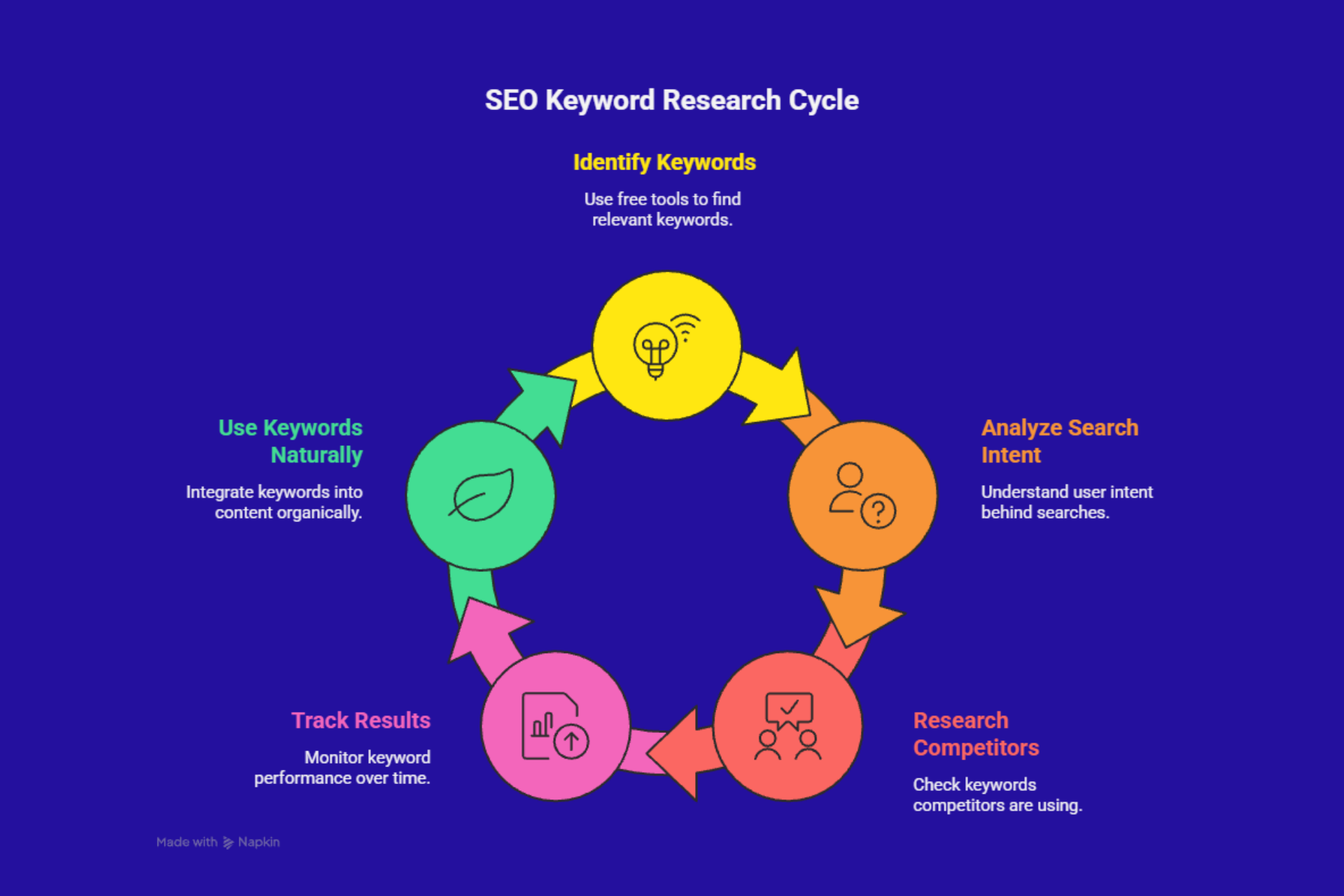
Focus on Long-Tail Keywords
These are longer phrases that are highly specific. They may not have as much search volume, but they usually have lower competition and higher conversion rates. -
Analyze Search Intent
Always consider the intent behind the search. Are users looking to make a purchase, learn something, or compare options? Match your keywords with the intent behind them to create valuable content. -
Research Competitors
Don’t just rely on free keyword tools for your own website. Check out the keywords your competitors are ranking for. Use that insight to find gaps and opportunities for your content. -
Track Results Over Time
Keyword trends shift constantly, so monitor your rankings regularly. What worked last month may not work this month. Stay updated on trends and tweak your SEO strategy accordingly. -
Use Keywords Naturally
While keywords are important, don’t overstuff them. Google values content that’s natural and helpful. Focus on creating high-quality content that incorporates your keywords in a way that feels organic.
Keyword research doesn’t have to be expensive to be effective. By using the right free keyword tool, you can unlock valuable insights that will help you improve your website’s SEO performance without the hefty price tag of premium tools.
From Google Keyword Planner to Ubersuggest and Answer the Public, these tools offer a wide range of features that can help you target the right keywords for your business. The key is to use these tools effectively, focusing on long-tail keywords, understanding search intent, and regularly tracking your results.
Remember, SEO is a long-term strategy, and keyword research is only one part of the equation. But by using a free keyword tool and staying ahead of trends, you’ll be well on your way to increasing your website’s visibility and driving more organic traffic.
